Warning: Trying to access array offset on null in /var/www/html/blog/pivotx/modules/module_lang.php on line 105

Warning: Trying to access array offset on null in /var/www/html/blog/pivotx/modules/module_lang.php on line 105

Warning: Trying to access array offset on null in /var/www/html/blog/pivotx/modules/module_lang.php on line 116

Deprecated: Creation of dynamic property Session::$cookie_lifespan is deprecated in /var/www/html/blog/pivotx/objects.php on line 2011

Deprecated: Creation of dynamic property Session::$cookie_name is deprecated in /var/www/html/blog/pivotx/objects.php on line 2012

Deprecated: Creation of dynamic property Session::$cookie_secure is deprecated in /var/www/html/blog/pivotx/objects.php on line 2024

Deprecated: Creation of dynamic property Session::$cookie_httponly is deprecated in /var/www/html/blog/pivotx/objects.php on line 2032

Deprecated: Creation of dynamic property Session::$cookie_path is deprecated in /var/www/html/blog/pivotx/objects.php on line 2043

Deprecated: Creation of dynamic property Session::$cookie_domain is deprecated in /var/www/html/blog/pivotx/objects.php on line 2053

Deprecated: Creation of dynamic property Messages::$badextensions is deprecated in /var/www/html/blog/pivotx/modules/module_messages.php on line 57

Deprecated: Creation of dynamic property Events::$edittimeout is deprecated in /var/www/html/blog/pivotx/objects.php on line 3604

Deprecated: Creation of dynamic property Languages::$codes is deprecated in /var/www/html/blog/pivotx/langs/codes/en.php on line 5

Deprecated: substr(): Passing null to parameter #2 ($offset) of type int is deprecated in /var/www/html/blog/pivotx/includes/streams.php on line 59

Deprecated: Creation of dynamic property Languages::$code is deprecated in /var/www/html/blog/pivotx/modules/module_lang.php on line 169

Deprecated: Creation of dynamic property Languages::$name is deprecated in /var/www/html/blog/pivotx/modules/module_lang.php on line 170

Deprecated: Creation of dynamic property px_Locale::$number is deprecated in /var/www/html/blog/pivotx/modules/module_lang.php on line 335

Deprecated: Creation of dynamic property px_Locale::$ordinal is deprecated in /var/www/html/blog/pivotx/modules/module_lang.php on line 358

Deprecated: Creation of dynamic property Extensions::$safemode is deprecated in /var/www/html/blog/pivotx/modules/module_extensions.php on line 59

Deprecated: Creation of dynamic property EntriesFlat::$global_reindex is deprecated in /var/www/html/blog/pivotx/modules/entries_flat.php on line 72

Deprecated: Creation of dynamic property EntriesFlat::$allow_index is deprecated in /var/www/html/blog/pivotx/modules/entries_flat.php on line 77

Deprecated: Creation of dynamic property EntriesFlat::$allow_write is deprecated in /var/www/html/blog/pivotx/modules/entries_flat.php on line 84

Deprecated: Creation of dynamic property db::$db_lowlevel is deprecated in /var/www/html/blog/pivotx/modules/module_db.php on line 48

Deprecated: Creation of dynamic property Pages::$db is deprecated in /var/www/html/blog/pivotx/objects.php on line 2570

Deprecated: Creation of dynamic property PagesFlat::$index is deprecated in /var/www/html/blog/pivotx/modules/pages_flat.php on line 154

Deprecated: Creation of dynamic property Extensions::$value is deprecated in /var/www/html/blog/pivotx/modules/module_extensions.php on line 600

Deprecated: Function utf8_decode() is deprecated in /var/www/html/blog/pivotx/lib.php on line 4535

Deprecated: Function utf8_decode() is deprecated in /var/www/html/blog/pivotx/lib.php on line 4535

Deprecated: str_replace(): Passing null to parameter #2 ($replace) of type array|string is deprecated in /var/www/html/blog/pivotx/modules/module_parser.php on line 2775

Deprecated: Creation of dynamic property db::$entry is deprecated in /var/www/html/blog/pivotx/modules/module_db.php on line 203

Deprecated: Creation of dynamic property Parser::$code is deprecated in /var/www/html/blog/pivotx/modules/module_parser.php on line 457

Deprecated: Function utf8_decode() is deprecated in /var/www/html/blog/pivotx/lib.php on line 4535

Deprecated: Function utf8_decode() is deprecated in /var/www/html/blog/pivotx/lib.php on line 4535

Deprecated: str_replace(): Passing null to parameter #2 ($replace) of type array|string is deprecated in /var/www/html/blog/pivotx/modules/module_parser.php on line 2775

Deprecated: Function utf8_decode() is deprecated in /var/www/html/blog/pivotx/lib.php on line 4535

Deprecated: Function utf8_decode() is deprecated in /var/www/html/blog/pivotx/lib.php on line 4535

Deprecated: Function utf8_decode() is deprecated in /var/www/html/blog/pivotx/lib.php on line 4535

Deprecated: Function utf8_decode() is deprecated in /var/www/html/blog/pivotx/lib.php on line 4535

Deprecated: Function utf8_decode() is deprecated in /var/www/html/blog/pivotx/lib.php on line 4535

Deprecated: Function utf8_decode() is deprecated in /var/www/html/blog/pivotx/lib.php on line 4535

Deprecated: str_replace(): Passing null to parameter #2 ($replace) of type array|string is deprecated in /var/www/html/blog/pivotx/modules/module_extensions.php on line 1012

Deprecated: str_replace(): Passing null to parameter #2 ($replace) of type array|string is deprecated in /var/www/html/blog/pivotx/modules/module_extensions.php on line 1012

Deprecated: str_replace(): Passing null to parameter #2 ($replace) of type array|string is deprecated in /var/www/html/blog/pivotx/modules/module_extensions.php on line 1012

Deprecated: str_replace(): Passing null to parameter #2 ($replace) of type array|string is deprecated in /var/www/html/blog/pivotx/modules/module_extensions.php on line 1012
Backing up Linux computer to Synology - NAS Hosting - The Offical Blog
NAS Hosting

NAS Hosting

Call us:   +1 (973) 494-8304 (US)

+44 (0)20 33559970 (UK)

Backing up Linux computer to Synology


Deprecated: Creation of dynamic property PivotxSmarty::$custom_template is deprecated in /var/www/html/blog/pivotx/modules/module_parser.php on line 2221

Quick Overview

Your Synology NAS can be a backup destination for your Linux computer by using any of the following protocols: rsync or FTP, CIFS, NFS or WebDAV, among which the most common is rsync. Automated backup can be performed with a written script; data transfer of the backup can be encrypted to protect your important data with a higher level of security.

This post will guide you step by step on how to back up data on your Linux system to your Synology NAS.

Configure your Synology NAS as the destination server

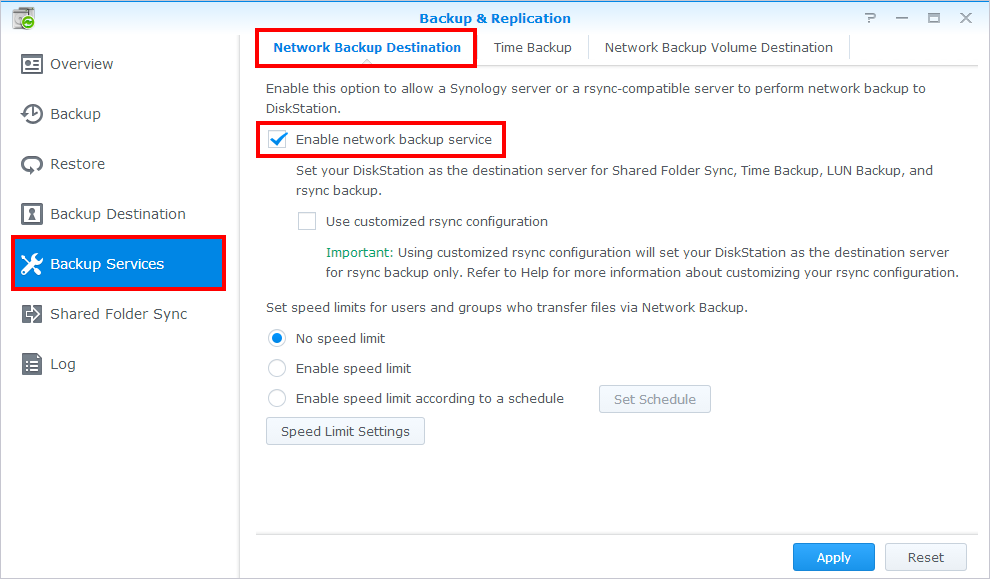
If you are looking to back up data from your Linux computer to Synology NAS, you need to enable Network Backup Service on the destination server first. To enable this function, please do the following:

Log in to DSM using an account belonging to the administrators group, or assign the application privilege for network backup destination to a user account (at Control Panel > Privileges) and log in with its credentials.

Open Backup & Replication.

Go to Backup Services > Network Backup Destination, and then tick Enable network backup service.

Click Apply.
To set up a DSM user with privileges on your Synology NAS:

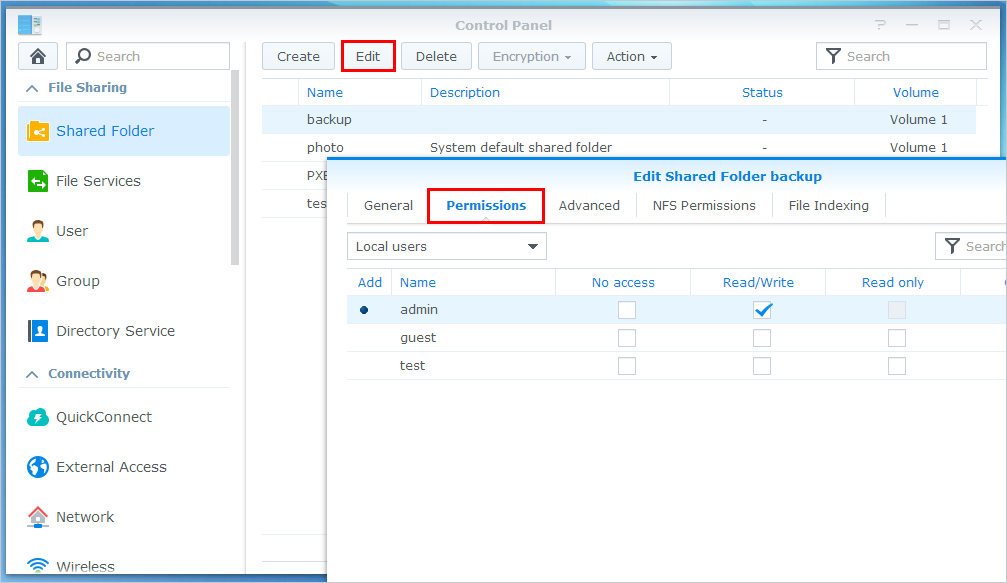
Go to Control Panel > Privileges, and allow the Network Backup Destination privilege to the user.

Then go to Control Panel > Shared Folder, select a shared folder, click Edit > Permissions, and then allow privileges to the user. 
 

Back up data from Linux server to Synology NAS

The most frequantly used way to back up data from Linux server to Synology NAS is to use rsync to make mirrored folders. You may need to mount the folder on the Synology NAS to your Linux server using CIFS or NFS mount beforehand. The command will be:

[root@www ~]# rsync -av [source_folder] [destination_folder]
# 1. Make /home/ mirror to /backupdata/home/
[root@www ~]# rsync -av /home /backupdata/

Or, you can simply execute the following command on your Linux computer without having to mount the folder. Note that ##.##.##.## in the example below should be replaced by the IP address of your Synology NAS and NetBackup with the destination shared folder on your NAS, if you want to back up data to shares other than the default folder:

rsync -av home/ admin@##.##.##.##::SynologyHosting/backupdata/

This data backup can also be encrypted by inserting -e ssh into the command:

rsync -av -e ssh home/ admin@##.##.##.##::SynologyHosting/backupdata/

When rsync is running, it will compare the data between your Synology NAS and Linux server, and only modified files will be transferred to save you time. You are also able to make daily backups using a Linux Backup Script.

If you are intertested in hosting your Synology NAS in our secure datacentre please feel free to contact us at any time and we will be happy to help Contact us